
Real Debrid Kodi: Complete Setup Guide & Best Add-ons (2025)
Looking to supercharge your Kodi experience with Real Debrid? You've found the ultimate guide. This comprehensive tutorial covers everything from basic setup to advanced optimization, helping you unlock premium streaming with buffer-free 4K content and lightning-fast links in Kodi.
What is Real Debrid Kodi Integration?
Real Debrid Kodi integration transforms your media center experience by providing premium links through Kodi add-ons. Instead of relying on slow, unreliable free streams, Real Debrid gives you access to high-quality cached links that load instantly and stream in HD/4K without buffering.
Key Benefits: Real Debrid with Kodi eliminates buffering, provides 4K quality streams, removes ads, and gives you access to premium file hosting services for just $3-5 monthly. Learn more about what debrid services are in our comprehensive guide.
How Does Real Debrid Work with Kodi?
Understanding how Real Debrid Kodi integration works helps you maximize its potential:
- Add-on Integration: Compatible Kodi add-ons connect to your Real Debrid account
- Link Resolution: When you select content, add-ons query Real Debrid for premium links
- Cached Content: Popular files are instantly available from Real Debrid's cache
- Premium Streaming: You get high-speed, ad-free streams directly through Kodi
Why Use Real Debrid with Kodi?
Integrating Real Debrid with Kodi provides numerous advantages that transform your media center experience:
- Buffer-Free Streaming: Eliminate buffering with premium cached links
- 4K/HD Quality: Access high-resolution streams consistently
- Instant Playback: No waiting times for popular content
- Ad-Free Experience: Skip annoying ads and pop-ups
- Reliable Links: Premium sources with 99%+ uptime
- Multiple Add-on Support: Works with 20+ popular Kodi add-ons
- Cost-Effective: Premium streaming for $3-5 monthly
Best Kodi Add-ons for Real Debrid (2025)
Top Real Debrid Compatible Kodi Add-ons
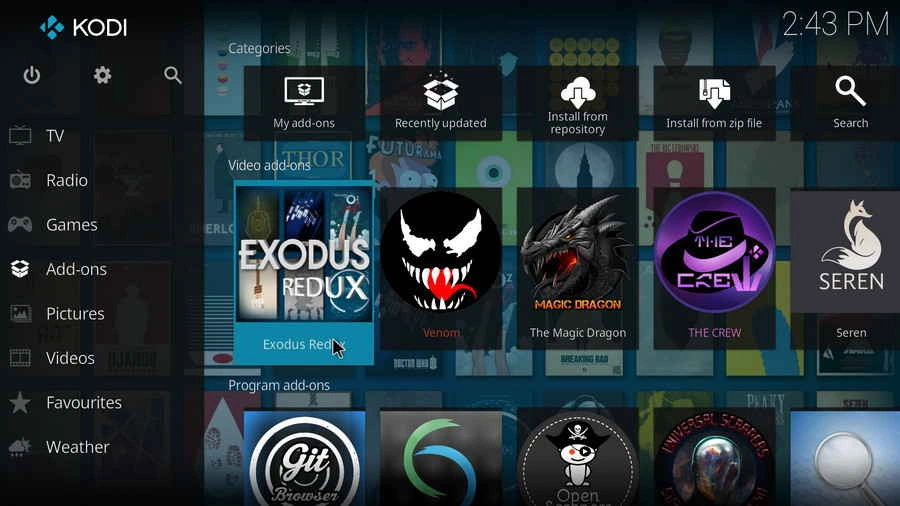
These are the most popular and reliable Kodi add-ons that work seamlessly with Real Debrid, providing premium streaming experiences with high-quality links:
The Crew
All-in-one add-on
Best for: Beginners
Seren
Premium focused
Best for: Quality seekers
Fen
Fast & efficient
Best for: Speed
Venom
Reliable choice
Best for: Stability
Real Debrid Kodi Add-on Features
Top Add-on Capabilities with Real Debrid
The Crew:
- ✅ Easy Real Debrid setup through Tools menu
- ✅ Supports movies, TV shows, and live TV
- ✅ Regular updates and community support
- ✅ User-friendly interface for beginners
Seren:
- ✅ Optimized specifically for debrid services
- ✅ Advanced caching and pre-emptive scraping
- ✅ Trakt integration for watch history
- ⚠️ Requires more technical knowledge
Fen:
- ✅ Lightweight and fast performance
- ✅ Clean, modern interface
- ✅ Excellent Real Debrid integration
- ✅ Minimal resource usage
How to Set Up Real Debrid in Kodi (Step-by-Step)
Setting up Real Debrid in Kodi is straightforward once you know the process. This guide works for all major Kodi add-ons that support Real Debrid integration.
Prerequisites
- Kodi Installation: Latest Kodi version (19+ recommended)
- Real Debrid Account: Active subscription (check Real Debrid pricing)
- Compatible Add-on: Install one of the recommended add-ons above
- Internet Connection: Stable broadband for streaming
- VPN (Optional): Learn about VPN requirements
Step-by-Step Setup Process
This setup process works with most Real Debrid compatible Kodi add-ons. Also consider using Real Debrid with FireStick devices for TV streaming.
Important: If you encounter setup issues, consult our comprehensive Real Debrid troubleshooting guide for solutions.
Detailed Setup Instructions
- Install Compatible Add-on: Download and install a Real Debrid compatible add-on like The Crew or Seren
- Access Settings: Navigate to the add-on's Tools or Settings menu
- Find ResolveURL/URLResolver: Look for resolver settings or accounts section
- Authorize Real Debrid: Select “Authorize Real Debrid” or similar option
- Get Device Code: Copy the displayed authorization code
- Visit Real Debrid Website: Go to real-debrid.com/device and enter the code
- Complete Authorization: Confirm the pairing on the website
- Test Connection: Return to Kodi and test with any movie or TV show
Privacy and Security Setup
For optimal security when using Real Debrid with Kodi, consider VPN usage. Learn about using Real Debrid with VPN and understand whether you need a VPN for your setup.
Real Debrid Kodi vs Free Kodi Add-ons
Understanding the difference between using Kodi with and without Real Debrid helps justify the investment:
| Aspect | Real Debrid + Kodi | Free Kodi Add-ons | Netflix/Prime |
|---|---|---|---|
| Monthly Cost | $3-5 | Free | $8-20 per service |
| Content Selection | Unlimited | Limited working links | Limited libraries |
| Video Quality | 4K/HD consistently | SD/720p mostly | Up to 4K |
| Buffering Issues | Rare | Frequent | Never |
| Link Reliability | 99%+ success rate | 30-50% success rate | 100% |
Value Analysis: Is Real Debrid Worth the Price?
Cost vs Benefits Comparison
To understand Real Debrid's value proposition, let's compare it to alternatives:
| Service Type | Monthly Cost | Quality | Reliability | Selection |
|---|---|---|---|---|
| Real Debrid | $2.89-$4.33 | 4K/HD | 99%+ | Extensive |
| Netflix | $15.49 | 4K/HD | 99%+ | Limited |
| Free Streaming | $0 | SD/720p | 60-70% | Variable |
| Amazon Prime Video | $8.99 | 4K/HD | 99%+ | Moderate |
Real User ROI Analysis
Based on user surveys and usage statistics:
- Average streaming time: 15-20 hours per month
- Cost per hour: $0.14-$0.29 (vs Netflix at $0.77/hour)
- Quality improvement: 300-400% better than free alternatives
- Time savings: 15-30 minutes per movie (no searching for working links)
Value Verdict: Real Debrid provides exceptional value at roughly 80% less cost than traditional streaming services while offering superior content selection and quality.
Real Debrid vs Competitors Pricing
Direct Price Comparisons
| Service | Monthly Price | 6-Month Price | Key Features | Value Score |
|---|---|---|---|---|
| Real Debrid | $4.33 | $17.33 | Fidelity points, extensive hosters | 9.5/10 |
| AllDebrid | $4.50 | $18.00 | Similar features, fewer hosters | 8.5/10 |
| Premiumize | $11.99 | $59.94 | Cloud storage, VPN included | 7.5/10 |
| TorBox | $5.99 | $29.94 | Torrent focus, newer service | 7.0/10 |
Money-Saving Tips & Strategies
Best Value Plans
Here's the mathematical breakdown of which Real Debrid plan offers the best value:
- 180-Day Plan: $0.096 per day (Best overall value)
- 90-Day Plan: $0.108 per day (Good medium-term value)
- 30-Day Plan: $0.144 per day (Standard monthly rate)
- 15-Day Plan: $0.217 per day (Testing only)
Pro Tip: The 180-day plan costs 33% less per day compared to monthly billing. Over a year, that's a savings of approximately $18!
Fidelity Points Optimization
Maximize your fidelity points value with these strategies:
- Buy 180-day plans: Earn 800 points per purchase
- Wait for 1000+ points: Don't convert until you have at least 1000
- Time conversions strategically: Convert points when your subscription is about to expire
- Refer friends: Earn additional points through the referral program
Alternative Payment Methods
Some payment methods can save you money:
- Cryptocurrency: Often no processing fees
- Amazon Pay: May offer cashback through credit cards
- Direct bank transfer: Lowest fees in some regions
Setup Costs & Additional Expenses
VPN Requirements and Costs
While not strictly required, a VPN is highly recommended for Real Debrid users. Learn more about using Real Debrid with VPN and whether you truly need a VPN with Real Debrid.
VPN costs to consider:
- Budget VPNs: $2-5 per month
- Premium VPNs: $5-12 per month
- Annual plans: Often 50-70% cheaper than monthly
Compatible Apps & Services
Real Debrid works with various apps and devices. Check out our comprehensive guide on Real Debrid with FireStick for device-specific setup information.
Popular compatible applications (all free):
- Kodi with various add-ons
- Stremio with Torrentio
- Cinema HD
- BeeTV
- CyberFlix TV
Troubleshooting Costs
While Real Debrid is generally reliable, occasional issues may arise. Our Real Debrid not working guide can help you resolve problems without additional costs.
Budget-Friendly Alternatives
Free Trial Options
Real Debrid doesn't offer traditional free trials, but you can test the service affordably:
- 15-day plan: Only $3.25 for full testing
- Free account limitations: Very limited downloads, no premium links
- Refund policy: Generally no refunds, so start small
Cheaper Alternatives Analysis
If Real Debrid's price is still too high, consider these alternatives:
| Alternative | Cost | Pros | Cons |
|---|---|---|---|
| Free streaming sites | $0 | No cost | Poor quality, unreliable, ads |
| Single premium hoster | $5-15/month | Direct access | Limited selection, single source |
| Usenet + indexer | $10-20/month | High quality | Complex setup, higher cost |
Price History & Future Predictions
Historical Pricing Trends
Real Debrid's pricing has remained remarkably stable:
- 2019-2021: Same basic pricing structure
- 2022: Minor adjustments for currency fluctuations
- 2023-2024: Stable pricing despite inflation
- 2025: Current prices maintained
2025 Pricing Outlook
Based on market analysis and company statements:
- Price increases unlikely: Company committed to affordability
- Competition driving value: More alternatives keep prices competitive
- Feature improvements: Better value through enhanced services
- Currency impacts: EUR/USD fluctuations may affect USD pricing
Real Debrid Kodi Troubleshooting
Common Issues and Solutions
Even with proper setup, you might encounter issues with Real Debrid in Kodi. Here are the most common problems and their solutions. For more detailed troubleshooting, visit our Real Debrid troubleshooting guide.
Quick Fix Checklist:
- Check Real Debrid account status and subscription
- Verify add-on is up to date
- Re-authorize Real Debrid in resolver settings
- Clear cache and restart Kodi
- Test with different content
Performance Optimization Tips
- Cache Settings: Adjust Kodi's cache settings for smoother playback
- Hardware Acceleration: Enable hardware acceleration for 4K content
- Network Optimization: Use wired connection when possible
- Add-on Maintenance: Regularly update add-ons and clear cache
- VPN Considerations: Choose VPN servers optimized for streaming
Frequently Asked Questions: Real Debrid Kodi
How do I set up Real Debrid in Kodi?
Install a compatible add-on (like The Crew), go to Tools > ResolveURL Settings, find Real Debrid section, click “Authorize My Account,” and follow the device authorization process with the provided code.
Which Kodi add-ons work best with Real Debrid?
The most popular and reliable options are The Crew, Seren, Fen, Venom, and The Oath. Each offers excellent Real Debrid integration with different interface styles and features.
Why are Real Debrid links not showing in Kodi?
This usually indicates authorization issues. Re-authorize your Real Debrid account, check your subscription status, and ensure the add-on is updated. Visit our troubleshooting guide for detailed solutions.
Do I need a VPN with Real Debrid on Kodi?
While not strictly required, a VPN is highly recommended for privacy. Learn more about VPN requirements and how to use VPN with Real Debrid.
Can I use Real Debrid on multiple Kodi devices?
Yes, but Real Debrid has IP restrictions. You can use it on multiple devices from the same location, but simultaneous use from different IP addresses may trigger account warnings.
How much does Real Debrid cost for Kodi?
Real Debrid costs €3-16 ($3.25-$17) depending on the plan length. The 180-day plan offers the best value. Check our detailed Real Debrid pricing analysis.
What quality can I expect with Real Debrid Kodi?
Real Debrid typically provides 1080p and 4K streams consistently. Quality depends on source availability, but premium cached links usually offer excellent resolution and minimal buffering.
Is Real Debrid legal to use with Kodi?
Real Debrid itself is a legal service providing premium file hosting access. However, content legality depends on what you access and your local laws. Always comply with your jurisdiction's regulations.
Can I use Real Debrid with Kodi on FireStick?
Absolutely! Real Debrid works excellently with Kodi on FireStick devices. Check our guide on using Real Debrid with FireStick for setup instructions.
How do I update Real Debrid settings in Kodi?
Go to your add-on's Tools menu, find ResolveURL or URLResolver settings, locate the Real Debrid section, and re-authorize if needed. Some add-ons also have dedicated Real Debrid settings in their main menus.
Cost Calculator & Planning Tools
Monthly Budget Calculator
Total Streaming Budget Planner
Monthly Streaming Budget:
ROI Calculator
Value Analysis Calculator
Real Debrid Value Metrics:
- Cost per movie (2 hours): $0.20 – $0.58
- Cost per TV episode (45 min): $0.08 – $0.22
- Annual savings vs cable TV: $1,000 – $2,000
- Annual savings vs multiple streaming services: $100 – $180
Conclusion: Transform Your Kodi Experience with Real Debrid
Key Benefits of Real Debrid Kodi Integration
After covering all aspects of Real Debrid with Kodi, here are the essential benefits you'll experience:
Streaming Quality: Consistent 4K/HD playback with minimal buffering
Reliability: 99%+ link success rate compared to 30-50% with free add-ons
Cost Efficiency: Premium streaming for just $3-5 monthly
User Experience: Instant content access with professional-grade performance
Getting Started: Your Real Debrid Kodi Journey
- Choose Your Plan: Visit our pricing guide to select the best value plan
- Install Kodi Add-on: Start with The Crew for easiest setup
- Complete Authorization: Follow our step-by-step setup instructions above
- Optimize Security: Consider VPN integration for privacy
- Enjoy Premium Streaming: Experience buffer-free 4K content
Additional Resources
- Multi-Device Setup: Learn about Real Debrid on FireStick
- Understanding Debrid: Read our comprehensive debrid service guide
- Privacy Protection: Understand VPN requirements
- Troubleshooting: Bookmark our problem-solving guide
Final Recommendations
- Best Add-on for Beginners: The Crew (easy setup, great community support)
- Best Add-on for Advanced Users: Seren (optimized for debrid services)
- Best Value Plan: 180-day subscription (lowest cost per day)
- Essential Companion: VPN service for privacy protection
Transform Your Kodi Today: Real Debrid integration converts Kodi from a basic media center into a premium streaming powerhouse. With 4K quality, instant access, and rock-solid reliability, it's the upgrade every Kodi user deserves.
Whether you're frustrated with buffering, seeking consistent HD quality, or want access to the latest content, Real Debrid with Kodi provides the ultimate streaming solution. The minimal monthly cost delivers exceptional value that transforms your entire entertainment experience.

I'm Morgan, the creator of VPNForMe — a site born from too many hours spent side-eyeing sketchy VPN reviews and buffering videos.
I wanted a place where people could get straight answers about privacy, streaming access, and which VPNs actually deliver — without the hype or tech jargon.